
Create a UPC-A Barcode
The UPC-A or UPC-12 is the most widely used barcode for product identification in the US retail industry. Clients must have a GS1 Company Prefix and 12-digit UPC number to create this barcode.
Click here for assistance obtaining a GS1 Company Prefix and creating UPCs.
If you already have a UPC number, enter the first 11 digits into the site. The site will calculate the check digit – the 12th digit – automatically. Make sure the site check digit matches the 12th digit of your UPC to confirm that the number has been assigned and entered correctly.
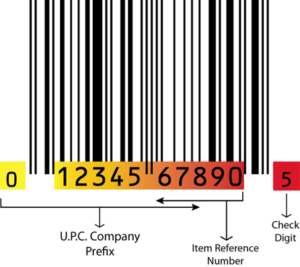
UPCs are commonly sized at 80% magnification. This creates a barcode that is about 1.2” wide and 0.8” tall. If your packaging requires a shorter barcode, select the ”80%, .5” height” option for a barcode that is 1.2” wide and 0.5” tall.
What size should a UPC barcode be?
The nominal (100%) UPC-A symbol is 1.469" wide by 1.02" tall. Most consumer packaging uses 80% magnification, about 1.2" x 0.8". If vertical space is limited, the height can be truncated to 0.5", though full-height symbols scan more reliably.
Do I need to buy a UPC number first?
Yes. A barcode image is only valid if the 12-digit number encoded in it was licensed through GS1. This generator does not sell numbers; it renders the number you already own into compliant artwork.
JPG or EPS for my packaging?
Use the free JPG only for on-screen mockups. Printed packaging requires the vector EPS, which scales without distortion and carries the bar width reduction printers need.